

Using AstroPhot with JAX#
In this notebook we will run through the same “getting started” tutorial, except this time using JAX!
You’ll notice right away that basically everything is the same. The only difference is that now all the data and parameters are stored as jax.numpy arrays. So if that’s how you prefer to interact with AstroPhot then forge on! AstroPhot should integrate with a JAX workflow very easily. If you want to treat AstroPhot in a functional way, then simply build the model you want then use f = lambda x: model(x).data and now f(x) returns the model image and you can do all the usual, vmap, autograd, etc stuff of JAX on this. Similarly, making l = lambda x: model.gaussian_log_likelihood(x) will return a scalar log likelihood function (Poisson also works). One note though, JAX has a reputation for being fast, this is true of JIT compiled JAX but not necessarily “eager” JAX where we simply define functions and evaluate them. This is the mode that AstroPhot mostly works in since it is so dynamic in the number of options it has and the freedom users have to change them. For this reason, you will find that AstroPhot is faster in PyTorch than JAX (uncompiled). For now we provide this API so JAX users can take advantage of AstroPhot in their workflow. So long as you work in a JAX-oriented way (JIT compile before expecting anything to be fast) then everything should work well and fast. There are only a handful of AstroPhot models that don’t work yet in JAX (notably the isothermal edgeon galaxy model since JAX doesn’t have the K1 Bessel function).
Note: AstroPhot is now a caskade ecosystem project, meaning its parameters have an incredible amount of flexibility. Check out the documentation for more details!
%matplotlib inline
%load_ext autoreload
%autoreload 2

import astrophot as ap
import numpy as np
import jax
from astropy.io import fits
from astropy.wcs import WCS
import matplotlib.pyplot as plt
Setting the backend to JAX#
The first thing we need to do is tell AstroPhot to start using JAX. The easiest way to do this is by setting the environment variable CASAKDE_BACKEND="jax" which will update the caskade parameter manager and AstroPhot to now use JAX. If you want to control the backend inside a script so that you can easily mix and match between scripts, then just make sure to set the backend at the beginning and don’t change it within one script!
ap.backend.backend = "jax"
# and that's it!
Your first model#
The basic format for making an AstroPhot model is given below. Once a model object is constructed, it can be manipulated and updated in various ways.
model1 = ap.Model(
    name="model1",
    model_type="sersic galaxy model",  # this specifies the kind of model
    # here we set initial values for each parameter
    center=[50, 50],
    q=0.6,
    PA=60 * np.pi / 180,
    n=2,
    Re=10,
    Ie=1,
    # every model needs a target, more on this later
    target=ap.TargetImage(data=np.zeros((100, 100)), zeropoint=22.5),
)

# models must/should be initialized before doing anything with them.
# This makes sure all the parameters and metadata are ready to go.
model1.initialize()

# We can print the model's current state
print(model1)
INFO:2026-03-25 15:04:58,699:jax._src.xla_bridge:830: Unable to initialize backend 'tpu': INTERNAL: Failed to open libtpu.so: libtpu.so: cannot open shared object file: No such file or directory
Unable to initialize backend 'tpu': INTERNAL: Failed to open libtpu.so: libtpu.so: cannot open shared object file: No such file or directory
model1|SersicGalaxy
    TargetImage|TargetImage
        crtan|static: [0, 0]
        crval|static: [0, 0]
        CD|static: [[1, 0], [0, 1]]
    center|dynamic: [50, 50]
    q|dynamic: 0.6
    PA|dynamic: 1.05
    n|dynamic: 2
    Re|dynamic: 10
    Ie|dynamic: 1
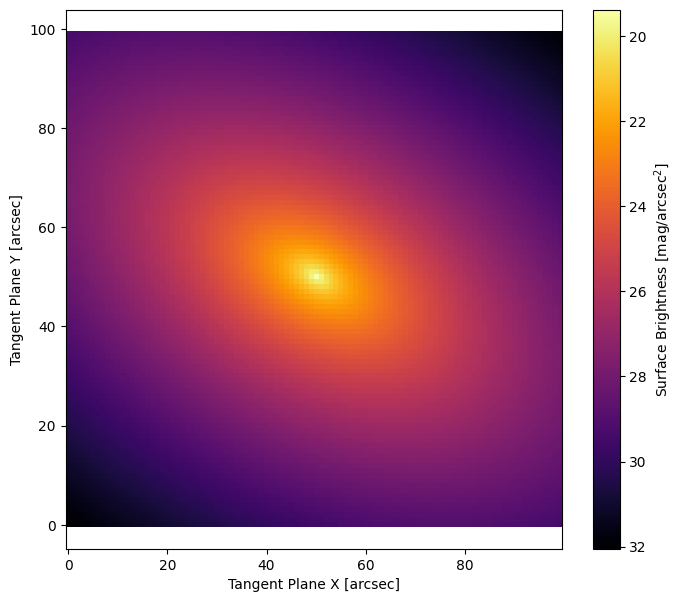
# AstroPhot has built in methods to plot relevant information. This plots the model
# as projected into the "target" image. Thus it has the same pixelscale, orientation
# and (optionally) PSF as the model's target.
fig, ax = plt.subplots(figsize=(8, 7))
ap.plots.model_image(fig, ax, model1)
plt.show()
Giving the model a Target#
Typically, the main goal when constructing an AstroPhot model is to fit to an image. We need to give the model access to the image and some information about it to get started.
# first let's download an image to play with
############# UNCOMMENT IF RUNNING LOCALLY ############
# hdu = fits.open(
#     "https://www.legacysurvey.org/viewer/fits-cutout?ra=36.3684&dec=-25.6389&size=700&layer=ls-dr9&pixscale=0.262&bands=r"
# )
hdu = fits.open("target_image.fits")
target_data = np.array(hdu[0].data, dtype=np.float64)

target = ap.TargetImage(
    data=target_data,
    pixelscale=0.262,
    zeropoint=22.5,  # optionally, a zeropoint tells AstroPhot the pixel flux units
    variance="auto",  # Automatic variance estimate for testing and demo purposes only! In real analysis use weight maps, counts, gain, etc to compute variance!
)

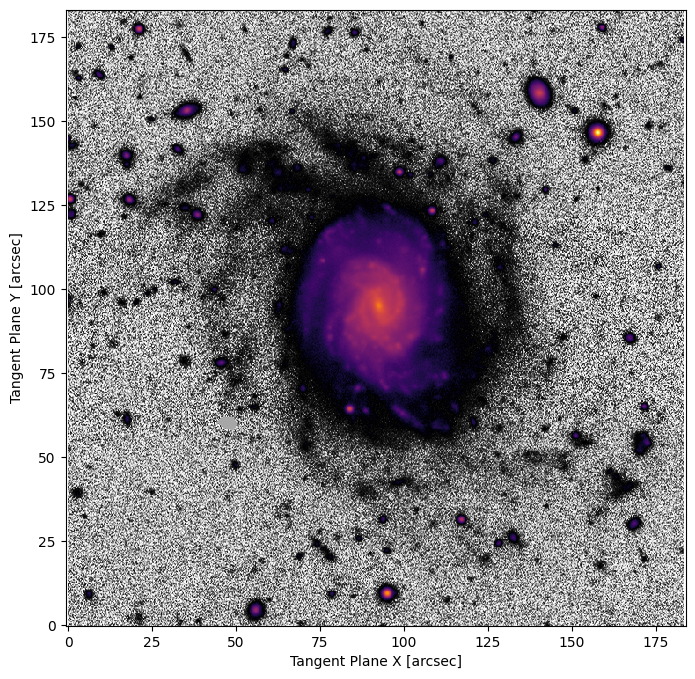
# The default AstroPhot target plotting method uses log scaling in bright areas and histogram scaling in faint areas
fig3, ax3 = plt.subplots(figsize=(8, 8))
ap.plots.target_image(fig3, ax3, target)
plt.show()
# This model now has a target that it will attempt to match
model2 = ap.Model(
    name="model_with_target",
    model_type="sersic galaxy model",
    target=target,
)

# Instead of giving initial values for all the parameters, it is possible to
# simply call "initialize" and AstroPhot will try to guess initial values for
# every parameter. It is also possible to set just a few parameters and let
# AstroPhot try to figure out the rest. For example you could give it an initial
# Guess for the center and it will work from there.
model2.initialize()

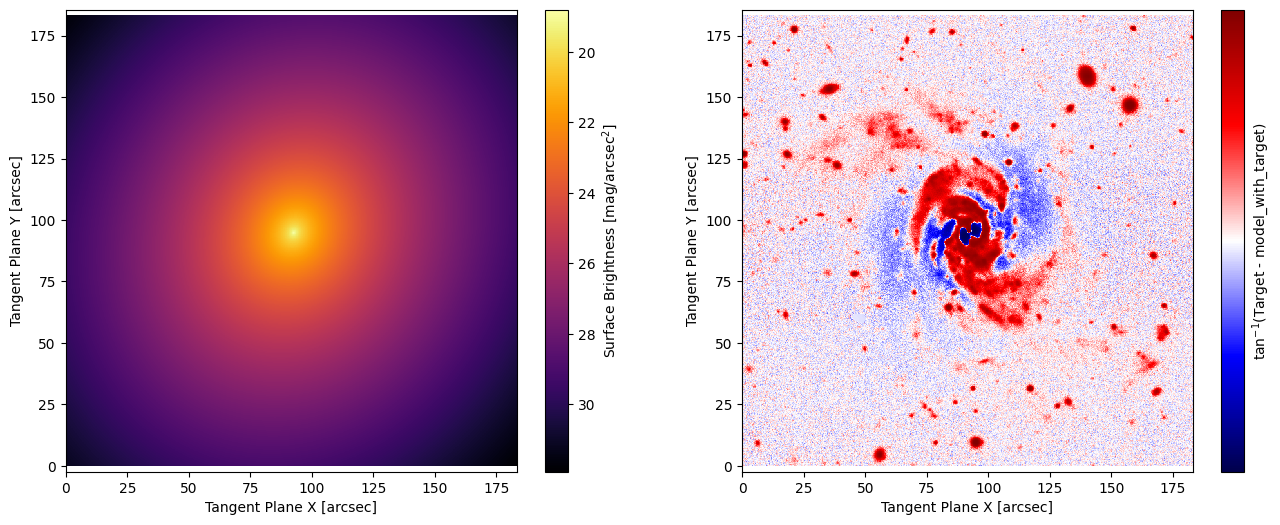
# Plotting the initial parameters and residuals, we see it gets the rough shape
# of the galaxy right, but still has some fitting to do
fig4, ax4 = plt.subplots(1, 2, figsize=(16, 6))
ap.plots.model_image(fig4, ax4[0], model2)
ap.plots.residual_image(fig4, ax4[1], model2)
plt.show()
# Now that the model has been set up with a target and initialized with parameter values, it is time to fit the image
result = ap.fit.LM(model2, verbose=1).fit()

# See that we use ap.fit.LM, this is the Levenberg-Marquardt Chi^2 minimization method, it is the recommended technique
# for most least-squares problems. See the Fitting Methods tutorial for more on fitters!
print("Fit message:", result.message)  # the fitter will store a message about its convergence
==Starting LM fit for 'model_with_target' with 7 dynamic parameters and 490000 pixels==
Chi^2/DoF: 7.46905, L: 1
Chi^2/DoF: 7.01169, L: 1
Chi^2/DoF: 6.84534, L: 0.111
Chi^2/DoF: 6.71701, L: 0.00137
Chi^2/DoF: 6.71123, L: 0.00137
Final Chi^2/DoF: 6.7112, L: 0.00137. Converged: success
Fit message: success
print(model2)
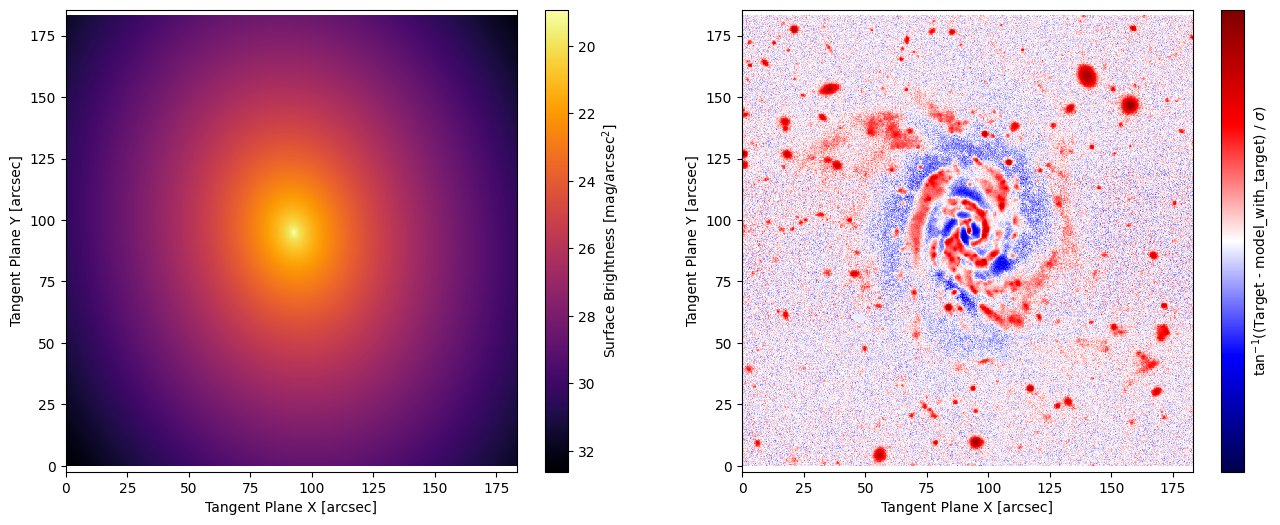
# we now plot the fitted model and the image residuals
fig5, ax5 = plt.subplots(1, 2, figsize=(16, 6))
ap.plots.model_image(fig5, ax5[0], model2)
ap.plots.residual_image(fig5, ax5[1], model2, normalize_residuals=True)
plt.show()
model_with_target|SersicGalaxy
    TargetImage|TargetImage
        crtan|static: [0, 0]
        crval|static: [0, 0]
        CD|static: [[0.262, 0], [0, 0.262]]
    center|dynamic: [92.7, 94.9]
    q|dynamic: 0.764
    PA|dynamic: 0.171
    n|dynamic: 1.64
    Re|dynamic: 14.6
    Ie|dynamic: 1.63
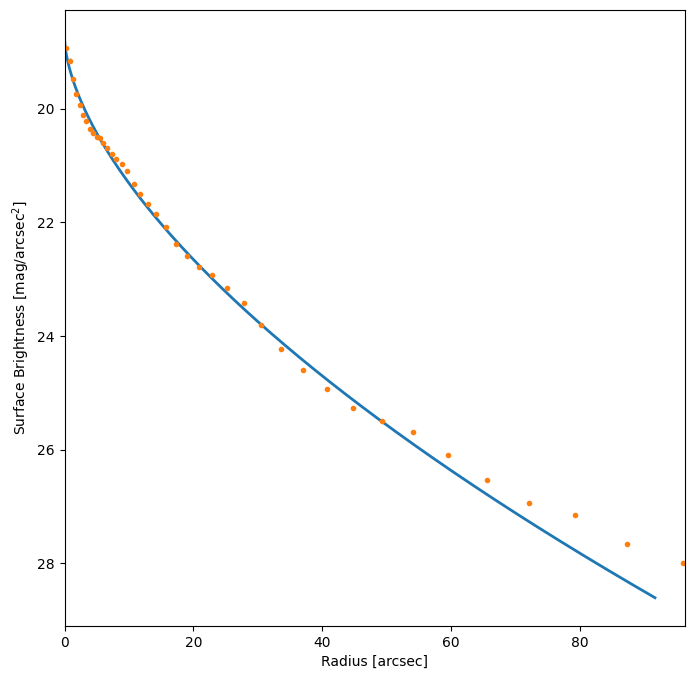
# Plot surface brightness profile

# we now plot the model profile and a data profile. The model profile is determined from the model parameters
# the data profile is determined by taking the median of pixel values at a given radius. Notice that the model
# profile is slightly higher than the data profile? This is because there are other objects in the image which
# are not being modelled, the data profile uses a median so they are ignored, but for the model we fit all pixels.
fig10, ax10 = plt.subplots(figsize=(8, 8))
ap.plots.radial_light_profile(fig10, ax10, model2)
ap.plots.radial_median_profile(fig10, ax10, model2)
plt.show()
Update uncertainty estimates#
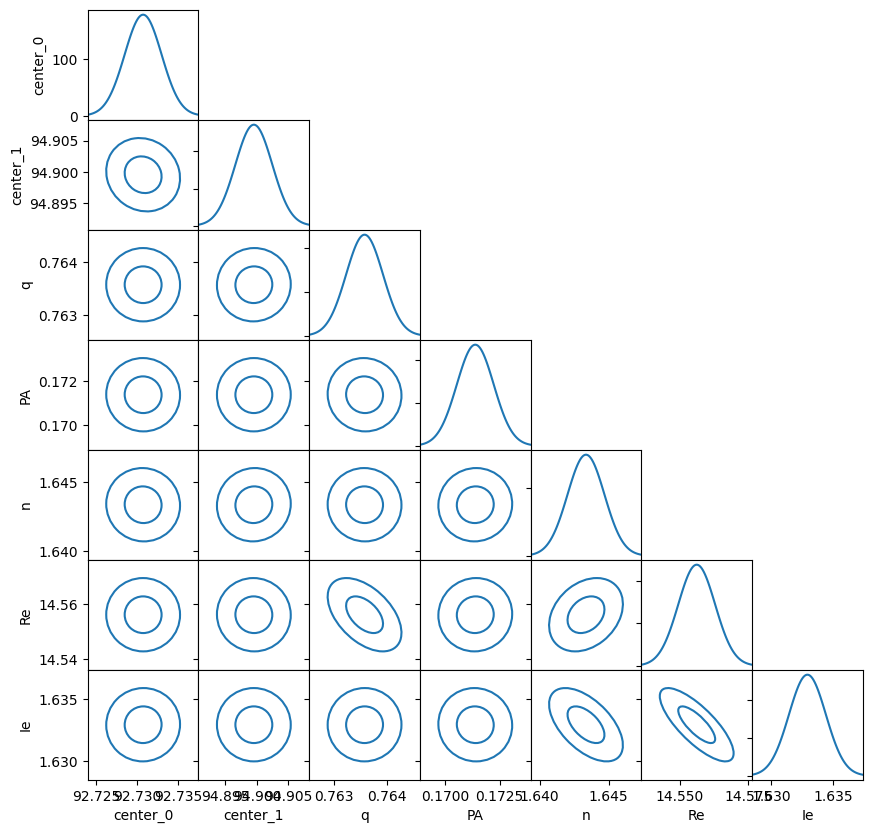
After running a fit, the ap.fit.LM optimizer can update the uncertainty for each parameter. In fact it can return the full covariance matrix if needed. For a demo of what can be done with the covariance matrix see the FittingMethods tutorial. One important note is that the variance image needs to be correct for the uncertainties to be meaningful!
result.update_uncertainty()
print(model2)
model_with_target|SersicGalaxy
    TargetImage|TargetImage
        crtan|static: [0, 0]
        crval|static: [0, 0]
        CD|static: [[0.262, 0], [0, 0.262]]
    center|dynamic: [92.7, 94.9]
    q|dynamic: 0.764
    PA|dynamic: 0.171
    n|dynamic: 1.64
    Re|dynamic: 14.6
    Ie|dynamic: 1.63
Note that these uncertainties are pure statistical uncertainties that come from evaluating the structure of the \(\chi^2\) minimum. Systematic uncertainties are not included and these often significantly outweigh the standard errors. As can be seen in the residual plot above, there is certainly plenty of unmodelled structure there. Use caution when interpreting the errors from these fits.
# Plot the uncertainty matrix

# While the scale of the uncertainty may not be meaningful if the image variance is not accurate, we
# can still see how the covariance of the parameters plays out in a given fit.
fig, ax = ap.plots.covariance_matrix(
    result.covariance_matrix,
    model2.get_values(),
    model2.build_params_array_names(),
)
plt.show()
Record the total flux/magnitude#
Often the parameter of interest is the total flux or magnitude, even if this isn’t one of the core parameters of the model, it can be computed. For Sersic and Moffat models with analytic total fluxes it will be integrated to infinity, for most other models it will simply be the total flux in the window.
print(
    f"Total Flux: {model2.total_flux().item():.1f} +- {model2.total_flux_uncertainty().item():.1f}"
)
print(
    f"Total Magnitude: {model2.total_magnitude().item():.4f} +- {model2.total_magnitude_uncertainty().item():.4f}"
)
Total Flux: 3921.7 +- 5.6
Total Magnitude: 13.5163 +- 0.0015
Giving the model a specific target window#
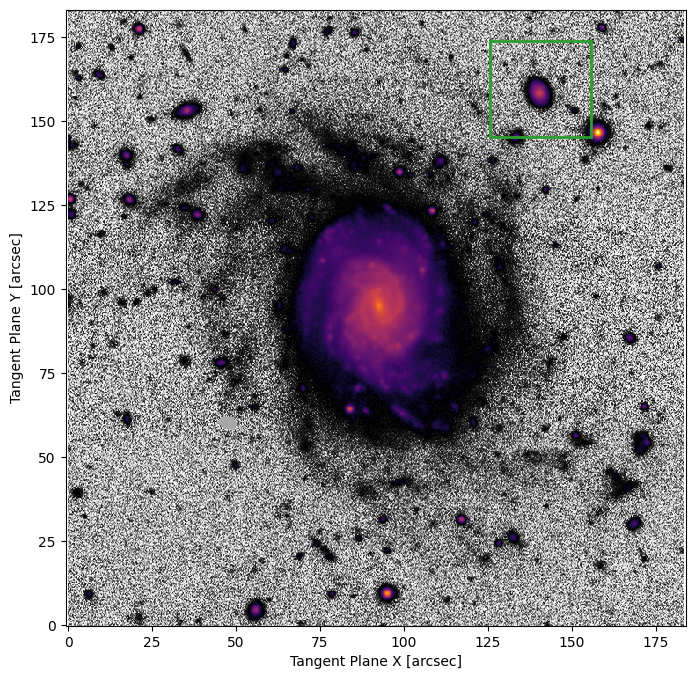
Sometimes an object isn’t nicely centered in the image, and may not even be the dominant object in the image. It is therefore nice to be able to specify what part of the image we should analyze.
# note, we don't provide a name here. A unique name will automatically be generated using the model type
model3 = ap.Model(
    model_type="sersic galaxy model",
    target=target,
    window=[480, 595, 555, 665],  # this is a region in pixel coordinates (imin,imax,jmin,jmax)
)
print(f"automatically generated name: '{model3.name}'")

# We can plot the "model window" to show us what part of the image will be analyzed by that model
fig6, ax6 = plt.subplots(figsize=(8, 8))
ap.plots.target_image(fig6, ax6, model3.target)
ap.plots.model_window(fig6, ax6, model3)
plt.show()
automatically generated name: 'SersicGalaxy'
model3.initialize()
result = ap.fit.LM(model3, verbose=1).fit()
==Starting LM fit for 'SersicGalaxy' with 7 dynamic parameters and 12650 pixels==
Chi^2/DoF: 7.07561, L: 1
Chi^2/DoF: 4.67827, L: 1
Chi^2/DoF: 3.91608, L: 0.111
Chi^2/DoF: 3.44182, L: 0.111
Chi^2/DoF: 3.16322, L: 0.0123
Chi^2/DoF: 3.1581, L: 0.00137
Final Chi^2/DoF: 3.15809, L: 2.32e-08. Converged: success
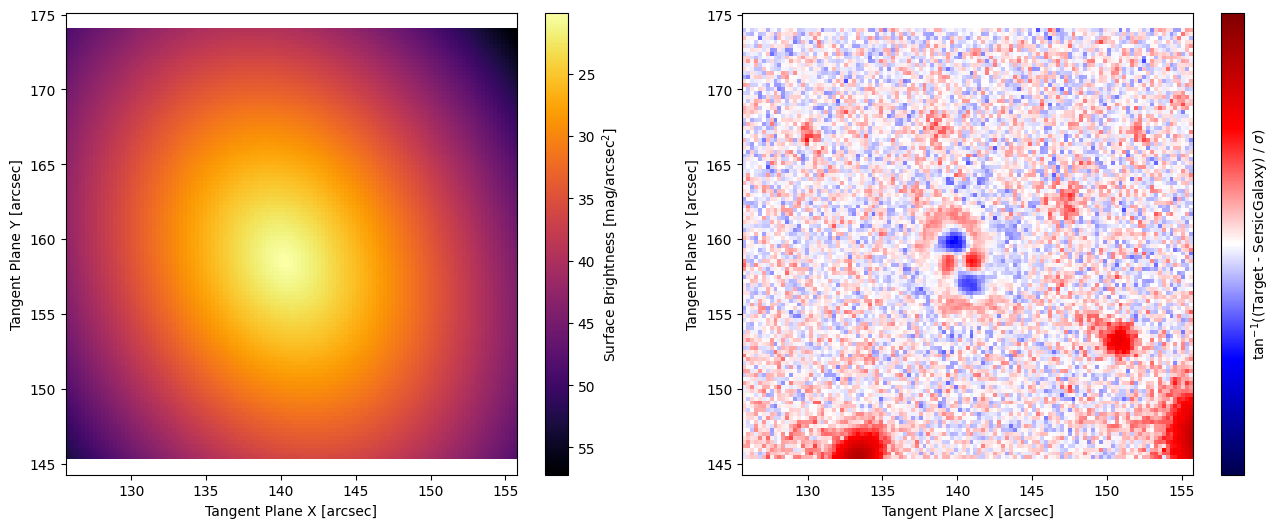
# Note that when only a window is fit, the default plotting methods will only show that window
print(model3)
fig7, ax7 = plt.subplots(1, 2, figsize=(16, 6))
ap.plots.model_image(fig7, ax7[0], model3)
ap.plots.residual_image(fig7, ax7[1], model3, normalize_residuals=True)
plt.show()
SersicGalaxy|SersicGalaxy
    TargetImage|TargetImage
        crtan|static: [0, 0]
        crval|static: [0, 0]
        CD|static: [[0.262, 0], [0, 0.262]]
    center|dynamic: [140, 159]
    q|dynamic: 0.771
    PA|dynamic: 0.398
    n|dynamic: 0.822
    Re|dynamic: 1.89
    Ie|dynamic: 2.55
Inspect parameters#
AstroPhot is all about managing parameters, so there is lots of information that comes with them, lets see some of the meta-data you can access:
print("Parameter units, sersic Re:", model3.Re.units)
print("Expected parameter shape, Re:", model3.Re.shape)
print("and for center it is:", model3.center.shape)
print("Parameter dynamic state, Re:", model3.Re.dynamic, "so it will be optimized by a fitter")
Parameter units, sersic Re: arcsec
Expected parameter shape, Re: ()
and for center it is: (2,)
Parameter dynamic state, Re: True so it will be optimized by a fitter
Set static/dynamic parameters#
You can control which parameters will be optimized during fitting by changing them between static and dynamic.
model3.Re.to_static()  # Now this value will not change
model3.Re.to_dynamic()  # Now this value will be optimized by a fitter again

model3.to_static()  # Now all parameters of this model will be static
model3.to_dynamic()  # Now all parameters of this model will be dynamic again

# For group models, you can set static/dynamic for all the sub-models at once by calling:
# group_model.to_static(children_only=False)
# group_model.to_dynamic(children_only=False)
# The default is for children_only to be true meaning only the immediate parameters would have been changed.
Setting parameter constraints#
A common feature of fitting parameters is that they have some constraint on their behaviour and cannot be sampled at any value from (-inf, inf). AstroPhot circumvents this by remapping any constrained parameter to a space where it can take any real value, at least for the sake of fitting. For most parameters these constraints are applied by default; for example the axis ratio q is required to be in the range (0,1). Other parameters, such as the position angle (PA) are cyclic, they can be in the range (0,pi) but also can wrap around. It is possible to manually set these constraints while constructing a model.
In general adding constraints makes fitting more difficult. There is a chance that the fitting process runs up against a constraint boundary and gets stuck. However, sometimes adding constraints is necessary and so the capability is included.
# here we make a sersic model that can only have q and n in a narrow range
# Also, we give PA and initial value and lock that so it does not change during fitting
constrained_param_model = ap.Model(
    name="constrained_parameters",
    model_type="sersic galaxy model",
    q={"valid": (0.4, 0.6)},
    n={"valid": (2, 3)},
    PA={"value": 60 * np.pi / 180},
    target=target,
)
Aside from constraints on an individual parameter, it is sometimes desirable to have different models share parameter values. For example you may wish to combine multiple simple models into a more complex model (more on that in a different tutorial), and you may wish for them all to have the same center. This can be accomplished with “equality constraints” as shown below.
# model 1 is a sersic model
model_1 = ap.Model(model_type="sersic galaxy model", center=[50, 50], PA=np.pi / 4, target=target)
# model 2 is an exponential model
model_2 = ap.Model(model_type="exponential galaxy model", target=target)

# Here we add the constraint for "PA" to be the same for each model.
# In doing so we provide the model and parameter name which should
# be connected.
model_2.PA = model_1.PA

# Here we can see how the two models now both can modify this parameter
print(
    "initial values: model_1 PA",
    model_1.PA.value.item(),
    "model_2 PA",
    model_2.PA.value.item(),
)
# Now we modify the PA for model_1
model_1.PA.value = np.pi / 3
print(
    "change model_1: model_1 PA",
    model_1.PA.value.item(),
    "model_2 PA",
    model_2.PA.value.item(),
)
initial values: model_1 PA 0.7853981633974483 model_2 PA 0.7853981633974483
change model_1: model_1 PA 1.0471975511965976 model_2 PA 1.0471975511965976
Basic things to do with a model#
Now that we know how to create a model and fit it to an image, lets get to know the model a bit better.
# Save the model state to a file

model2.save_state("current_spot.hdf5", appendable=True)  # save as it is
model2.q = 0.1  # do some updates to the model
model2.PA = 0.1
model2.n = 0.9
model2.Re = 0.1
model2.append_state("current_spot.hdf5")  # save the updated model state as often as you like
# load a model state from a file

model2.load_state("current_spot.hdf5", index=0)  # load the first state from the file
print(model2)  # see that the values are back to where they started
model_with_target|SersicGalaxy
    TargetImage|TargetImage
        crtan|static: [0, 0]
        crval|static: [0, 0]
        CD|static: [[0.262, 0], [0, 0.262]]
    center|dynamic: [92.7, 94.9]
    q|dynamic: 0.764
    PA|dynamic: 0.171
    n|dynamic: 1.64
    Re|dynamic: 14.6
    Ie|dynamic: 1.63
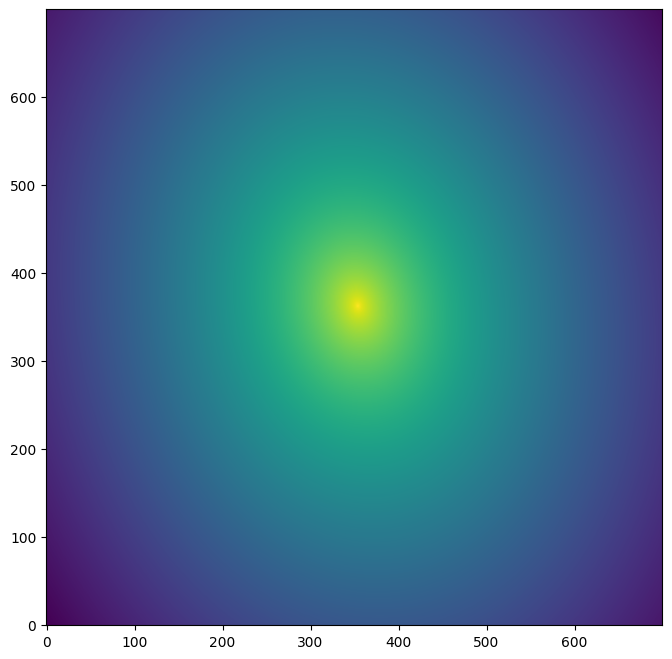
# Save the model image to a file

model_image_sample = model2()
model_image_sample.save("model2.fits")

saved_image_hdu = fits.open("model2.fits")
fig, ax = plt.subplots(figsize=(8, 8))
ax.imshow(
    np.log10(saved_image_hdu[0].data),
    origin="lower",
    cmap="viridis",
)
plt.show()
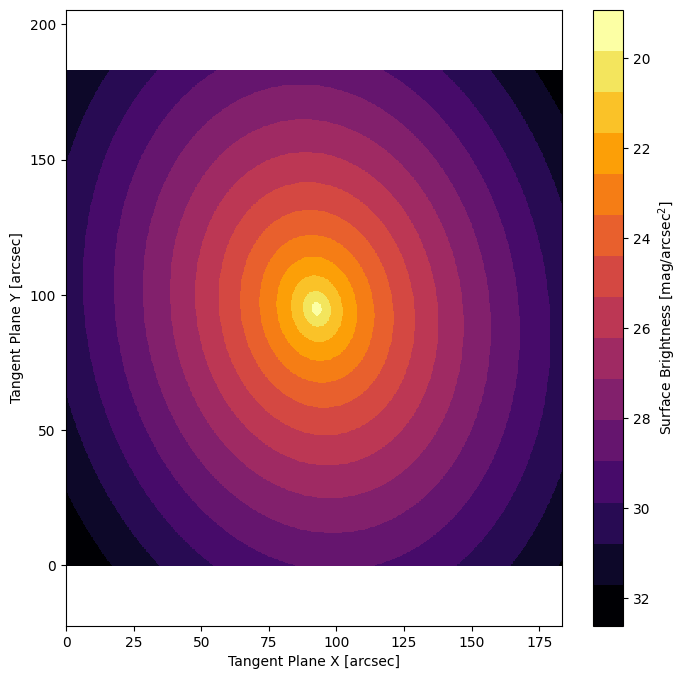
# Plot model image with discrete levels

# this is very useful for visualizing subtle features and for eyeballing the brightness at a given location.
# just add the "cmap_levels" keyword to the model_image call and tell it how many levels you want
fig11, ax11 = plt.subplots(figsize=(8, 8))
ap.plots.model_image(fig11, ax11, model2, cmap_levels=15)
plt.show()
# Save and load a target image

target.save("target.fits")

# Note that it is often also possible to load from regular FITS files
new_target = ap.TargetImage(filename="target.fits")

fig, ax = plt.subplots(figsize=(8, 8))
ap.plots.target_image(fig, ax, new_target)
plt.show()
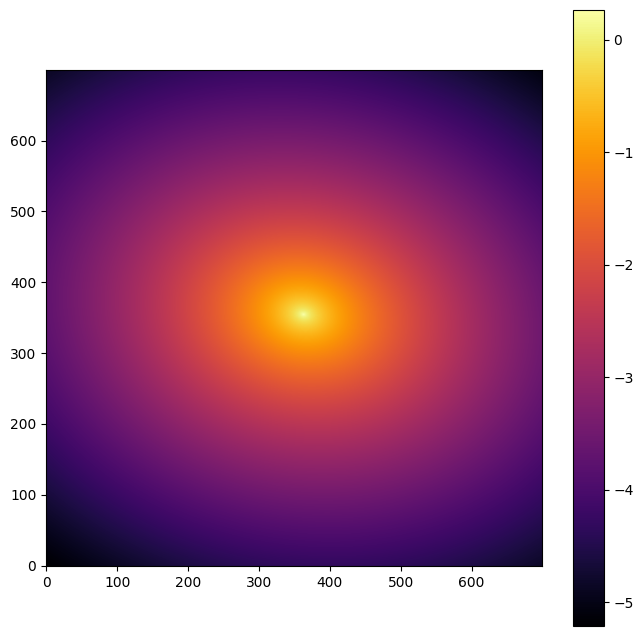
# Access the model image pixels directly

fig2, ax2 = plt.subplots(figsize=(8, 8))

# Transpose because AstroPhot indexes with (i,j) while numpy uses (j,i)
pixels = model2().data.T

im = plt.imshow(
    np.log10(pixels),  # take log10 for better dynamic range
    origin="lower",
    cmap=ap.plots.visuals.cmap_grad,  # gradient colourmap default for AstroPhot
)
plt.colorbar(im)
plt.show()
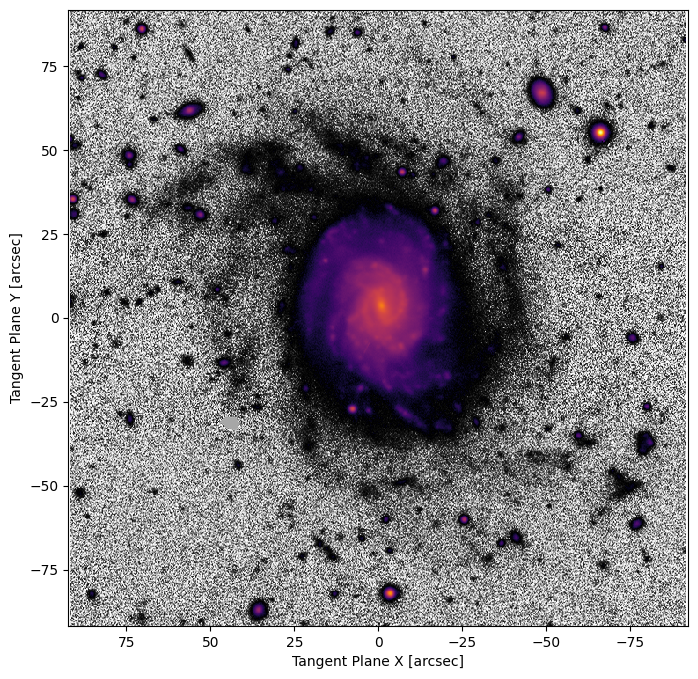
Load target with WCS information#
# first let's download an image to play with
# filename = "https://www.legacysurvey.org/viewer/fits-cutout?ra=36.3684&dec=-25.6389&size=700&layer=ls-dr9&pixscale=0.262&bands=r"
hdu = fits.open("target_image.fits")
target_data = np.array(hdu[0].data, dtype=np.float64)

wcs = WCS(hdu[0].header)

# Create a target object with WCS which will specify the pixelscale and origin for us!
target = ap.TargetImage(
    data=target_data,
    zeropoint=22.5,
    wcs=wcs,
)

fig3, ax3 = plt.subplots(figsize=(8, 8))
ap.plots.target_image(fig3, ax3, target)
plt.show()
Even better, just load directly from a FITS file#
AstroPhot recognizes standard FITS keywords to extract a target image. Note that this wont work for all FITS files, just ones that define the following keywords: CTYPE1, CTYPE2, CRVAL1, CRVAL2, CRPIX1, CRPIX2, CD1_1, CD1_2, CD2_1, CD2_2, and MAGZP with the usual meanings. AstroPhot can also handle SIP, see the SIP tutorial for details there.
Further keywords specific to AstroPhot that it uses for some advanced features like multi-band fitting are: CRTAN1, CRTAN2 used for aligning images, and IDNTY used for identifying when two images are actually cutouts of the same image. And AstroPhot also will store the PSF, WEIGHT, and MASK in extra extensions of the FITS file when it makes one.
target = ap.TargetImage(filename="target_image.fits")

fig3, ax3 = plt.subplots(figsize=(8, 8))
ap.plots.target_image(fig3, ax3, target)
plt.show()
# List all the available model names

# AstroPhot keeps track of all the subclasses of the AstroPhot Model object, this list will
# include all models even ones added by the user
print(ap.Model.List_Models(usable=True, types=True))
print("---------------------------")
# It is also possible to get all sub models of a specific Type
print("only galaxy models: ", ap.models.GalaxyModel.List_Models(types=True))
{'king warp psf model', 'truncated exponential galaxy model', 'moffat superellipse galaxy model', 'nuker galaxy model', 'moffat ray galaxy model', 'gaussian ellipse psf model', 'exponential superellipse psf model', 'gaussian galaxy model', 'gaussian fourier psf model', 'sersic fourier psf model', 'nuker fourier galaxy model', 'sersic ellipse psf model', 'sersic wedge galaxy model', 'point model', 'moffat warp galaxy model', 'nuker warp galaxy model', 'spline ray galaxy model', 'pixelated model', 'spline psf model', 'nuker ray galaxy model', 'king superellipse psf model', 'ferrer psf model', 'king ellipse psf model', 'truncated sersic warp galaxy model', 'sersic superellipse psf model', 'exponential fourier galaxy model', 'group model', 'gaussian warp psf model', 'king psf model', 'spline ellipse psf model', 'mge model', 'spline wedge galaxy model', 'moffat warp psf model', 'ferrer superellipse psf model', 'king wedge galaxy model', 'ferrer ray galaxy model', 'nuker superellipse galaxy model', 'moffat psf model', 'ferrer superellipse galaxy model', 'exponential psf model', 'truncated ferrer superellipse galaxy model', 'king galaxy model', 'ferrer fourier psf model', 'ferrer galaxy model', 'truncated king fourier galaxy model', 'spline superellipse psf model', 'sersic warp galaxy model', 'flat sky model', 'moffat ellipse psf model', 'truncated nuker fourier galaxy model', 'nuker ellipse psf model', 'truncated moffat warp galaxy model', 'truncated exponential fourier galaxy model', 'king ray galaxy model', 'truncated exponential warp galaxy model', 'ferrer warp psf model', 'isothermal sech2 edgeon model', 'batch scene model', 'spline superellipse galaxy model', 'plane sky model', 'gaussian wedge galaxy model', 'spline galaxy model', 'gaussian psf model', 'sersic fourier galaxy model', 'basis psf model', 'spline warp galaxy model', 'truncated nuker galaxy model', 'airy psf model', 'truncated gaussian galaxy model', 'exponential warp psf model', 'basis model', 'king warp galaxy model', 'truncated spline fourier galaxy model', 'truncated gaussian fourier galaxy model', 'spline fourier psf model', 'nuker wedge galaxy model', 'sersic warp psf model', 'exponential galaxy model', 'ferrer wedge galaxy model', 'moffat fourier psf model', 'truncated king warp galaxy model', 'gaussian fourier galaxy model', 'batch model', 'truncated moffat galaxy model', 'exponential ellipse psf model', 'gaussianellipsoid model', 'truncated ferrer fourier galaxy model', 'truncated king galaxy model', 'truncated ferrer galaxy model', 'moffat superellipse psf model', 'truncated gaussian superellipse galaxy model', 'moffat galaxy model', 'sersic ray galaxy model', 'king fourier galaxy model', 'truncated sersic galaxy model', 'exponential superellipse galaxy model', 'sersic galaxy model', 'gaussian ray galaxy model', 'truncated ferrer warp galaxy model', 'truncated sersic superellipse galaxy model', 'truncated nuker warp galaxy model', 'truncated exponential superellipse galaxy model', 'truncated nuker superellipse galaxy model', 'exponential fourier psf model', 'moffat fourier galaxy model', 'truncated sersic fourier galaxy model', 'king fourier psf model', 'truncated moffat superellipse galaxy model', 'truncated moffat fourier galaxy model', 'spline warp psf model', 'psf group model', 'nuker superellipse psf model', 'truncated spline superellipse galaxy model', 'moffat wedge galaxy model', 'nuker fourier psf model', 'gaussian superellipse galaxy model', 'exponential ray galaxy model', 'truncated spline galaxy model', 'sersic psf model', 'exponential warp galaxy model', 'nuker psf model', 'ferrer warp galaxy model', 'spline fourier galaxy model', 'nuker warp psf model', 'ferrer fourier galaxy model', 'exponential wedge galaxy model', 'truncated king superellipse galaxy model', 'sersic superellipse galaxy model', 'pixelated psf model', 'bilinear sky model', 'gaussian superellipse psf model', 'king superellipse galaxy model', 'truncated spline warp galaxy model', 'ferrer ellipse psf model', 'gaussian warp galaxy model', 'truncated gaussian warp galaxy model'}
---------------------------
only galaxy models:  {'truncated exponential galaxy model', 'moffat superellipse galaxy model', 'nuker galaxy model', 'moffat ray galaxy model', 'gaussian galaxy model', 'nuker fourier galaxy model', 'sersic wedge galaxy model', 'moffat warp galaxy model', 'nuker warp galaxy model', 'spline ray galaxy model', 'nuker ray galaxy model', 'truncated sersic warp galaxy model', 'exponential fourier galaxy model', 'spline wedge galaxy model', 'king wedge galaxy model', 'ferrer ray galaxy model', 'nuker superellipse galaxy model', 'ferrer superellipse galaxy model', 'truncated ferrer superellipse galaxy model', 'king galaxy model', 'ferrer galaxy model', 'truncated king fourier galaxy model', 'sersic warp galaxy model', 'truncated nuker fourier galaxy model', 'truncated moffat warp galaxy model', 'truncated exponential fourier galaxy model', 'king ray galaxy model', 'truncated exponential warp galaxy model', 'spline superellipse galaxy model', 'spline galaxy model', 'gaussian wedge galaxy model', 'sersic fourier galaxy model', 'spline warp galaxy model', 'truncated nuker galaxy model', 'truncated gaussian galaxy model', 'king warp galaxy model', 'truncated spline fourier galaxy model', 'truncated gaussian fourier galaxy model', 'nuker wedge galaxy model', 'exponential galaxy model', 'ferrer wedge galaxy model', 'truncated king warp galaxy model', 'gaussian fourier galaxy model', 'truncated moffat galaxy model', 'truncated ferrer fourier galaxy model', 'truncated king galaxy model', 'truncated ferrer galaxy model', 'truncated gaussian superellipse galaxy model', 'moffat galaxy model', 'sersic ray galaxy model', 'king fourier galaxy model', 'truncated sersic galaxy model', 'exponential superellipse galaxy model', 'sersic galaxy model', 'gaussian ray galaxy model', 'truncated ferrer warp galaxy model', 'truncated sersic superellipse galaxy model', 'truncated nuker warp galaxy model', 'truncated exponential superellipse galaxy model', 'truncated nuker superellipse galaxy model', 'moffat fourier galaxy model', 'truncated sersic fourier galaxy model', 'truncated moffat superellipse galaxy model', 'truncated moffat fourier galaxy model', 'truncated spline superellipse galaxy model', 'moffat wedge galaxy model', 'gaussian superellipse galaxy model', 'exponential ray galaxy model', 'truncated spline galaxy model', 'exponential warp galaxy model', 'ferrer warp galaxy model', 'spline fourier galaxy model', 'ferrer fourier galaxy model', 'exponential wedge galaxy model', 'truncated king superellipse galaxy model', 'sersic superellipse galaxy model', 'king superellipse galaxy model', 'truncated spline warp galaxy model', 'gaussian warp galaxy model', 'truncated gaussian warp galaxy model'}
Using GPU acceleration#
This one is easy! If you have a cuda enabled GPU available, JAX will just automatically detect it and use that device.
# this is different for the JAX version, JAX automatically handles device placement
# So AstroPhot just gives None as the device to let JAX to its thing
print(ap.config.DEVICE)
None
Boost GPU acceleration with single precision float32#
If you are using a GPU you can get significant performance increases in both memory and speed by switching from double precision (float64, the AstroPhot default) to single precision (float32) floating point numbers. The trade off is reduced precision, this can cause some unexpected behaviors. For example an optimizer may keep iterating forever if it is trying to optimize down to a precision below what the float32 will track. Typically, numbers with float32 are good down to 6 places and AstroPhot by default only attempts to minimize the Chi^2 to 3 places. However, to ensure the fit is secure to 3 places it often checks what is happening down at 4 or 5 places. Hence, issues can arise. For the most part you can go ahead with float32 and if you run into a weird bug, try on float64 before looking further.
JAX has a global automatic type, so its not always a good idea to try and specify the type. By default, AstroPhot enables the jax.config.update("jax_enable_x64", True) option so JAX will automatically use float64. You can switch this flag in the JAX config if you’s like to use float32. That said, it is still possible to use the global AstroPhot config to set the data type.
# Again do this BEFORE creating anything else
ap.config.DTYPE = jax.numpy.float32

# Now new AstroPhot objects will be made with single bit precision
T1 = ap.TargetImage(data=np.zeros((100, 100)))
T1.to()
print("now a single:", T1.data.dtype)

# Here we switch back to double precision
ap.config.DTYPE = jax.numpy.float64
T2 = ap.TargetImage(data=np.zeros((100, 100)))
T2.to()
print("back to double:", T2.data.dtype)
print("old image is still single!:", T1.data.dtype)
now a single: float32
back to double: float64
old image is still single!: float32
See how the window created as a float32 stays that way? That’s really bad to have lying around! Make sure to change the data type before creating anything!
Tracking output#
The AstroPhot optimizers, and occasionally the other AstroPhot objects, will provide status updates about themselves which can be very useful for debugging problems or just keeping tabs on progress. There are a number of use cases for AstroPhot, each having different desired output behaviors. To accommodate all users, AstroPhot implements a general logging system. The object ap.config.logger is a logging object which by default writes to AstroPhot.log in the local directory. As the user, you can set that logger to be any logging object you like for arbitrary complexity. Most users will, however, simply want to control the filename, or have it output to screen instead of a file. Below you can see examples of how to do that.
# note that the log file will be where these tutorial notebooks are in your filesystem

# Here we change the settings so AstroPhot only prints to a log file
ap.config.set_logging_output(stdout=False, filename="AstroPhot.log")
ap.config.logger.info("message 1: this should only appear in the AstroPhot log file")

# Here we change the settings so AstroPhot only prints to console
ap.config.set_logging_output(stdout=True, filename=None)
ap.config.logger.info("message 2: this should only print to the console")

# Here we change the settings so AstroPhot prints to both, which is the default
ap.config.set_logging_output(stdout=True, filename="AstroPhot.log")
ap.config.logger.info("message 3: this should appear in both the console and the log file")
message 2: this should only print to the console
message 3: this should appear in both the console and the log file
You can also change the logging level and/or formatter for the stdout and filename options (see help(ap.config.set_logging_output) for details). However, at that point you may want to simply make your own logger object and assign it to the ap.config.logger variable.